wolfram Alpha is a new tool which is available on web.
Check out video to get amazed with what all you can to with this search engine
Showing posts with label Tips. Show all posts
Showing posts with label Tips. Show all posts
Wednesday, October 20, 2010


Tuesday, October 19, 2010
Wednesday, June 16, 2010
Beautiful ad for seat belt
Very nicely executed video with all emotions
One who feels this will definitely fill their eyes with tears..
I enjoyed it hope you also will enjoy
One who feels this will definitely fill their eyes with tears..
I enjoyed it hope you also will enjoy
Tuesday, June 1, 2010
How to compress MP3 files using winamp
compress mp3 files, convert mp3 files, reduce mp3 file size
 Step 1: Open Winamp.
Step 2: Click the "PL" button on the right side of the player if the playlist isn't already open ( the box where it tells the names of songs, lengths, etc.)
Step 3: Once open, press the "+ file" button on the bottom left of the playlist.
Step 4: Locate the songs you want to compress ( they are most likely in C:/Program Files/Napster/Music or wherever else you keep your mp3s)
Step 5: Select the songs you want to compress by highlighting them and then pressing open.
Step 6: Now that you are back into the player click the little button on the top left of the player and go down to options, then to preferences.
Step 7: Once in preferences click on "Plug-Ins" then click on "output"
Step 8: After clicking on output double click on "Nullsoft Disk Writer Plug-In vX.X" and select where you want your files to go, desktop or something easy is a good choice. After that press ok, then close out of that window.
 Step 1: Open Winamp.
Step 2: Click the "PL" button on the right side of the player if the playlist isn't already open ( the box where it tells the names of songs, lengths, etc.)
Step 3: Once open, press the "+ file" button on the bottom left of the playlist.
Step 4: Locate the songs you want to compress ( they are most likely in C:/Program Files/Napster/Music or wherever else you keep your mp3s)
Step 5: Select the songs you want to compress by highlighting them and then pressing open.
Step 6: Now that you are back into the player click the little button on the top left of the player and go down to options, then to preferences.
Step 7: Once in preferences click on "Plug-Ins" then click on "output"
Step 8: After clicking on output double click on "Nullsoft Disk Writer Plug-In vX.X" and select where you want your files to go, desktop or something easy is a good choice. After that press ok, then close out of that window.
Step 9: In the same window Enable convert to format option and select the type and compress level of the file you want to compress
Step 10: Now, once you are back in the player and have your selected files visible in the playlist box you can press play. The songs will not play, the time bar should move quickly and then go on to the next selected song. This means your songs are being converted to "your selected" format.
Step 10: Now, once you are back in the player and have your selected files visible in the playlist box you can press play. The songs will not play, the time bar should move quickly and then go on to the next selected song. This means your songs are being converted to "your selected" format.
Step 11: Check out the converted file in the location specified by you at "STEP 8"
Tuesday, April 20, 2010
GM Diet - With Chicken
GM Diet Program: The General Motors Diet targets a weight loss of 7-10 lbs in seven days. It also helps in flushing and cleaning out toxins.
The General Motors Weight Loss Diet was developed for the employees of the firm. However, the diet proved so useful that the world cannot stop listing its benefits. Along with being a perfect recipe for a fast weight loss, it also helps detoxify and cleanse the system.
According to the diet, you must completely abstain from drinking alcohol. You should ideally take 10-15 glasses of water everyday as it helps flush out the toxins from your body. You can consume the following beverages – water flavored with lemon, club soda, black coffee – no cream, no substitutes and no sugar.
Important: No fruit juices before Day Seven.
Day One: Eat as many fruits as you want. No bananas though. If watermelon or cantaloupe is available, take huge quantities of it. Watermelon will enable you to lose 3-4 lbs on the first day. Day One would prepare the system for the week to come.
Day Two: Eat all vegetables – raw or cooked – of your choice in any quantity. A cooked vegetable does not mean vegetables made in curry or with spices. You can make food palatable by adding a dollop of butter or some salad dressing to it. This is taken for energy and balance. You can start the day by eating a baked potato but the rest of the vegetables consumed during the day should be calorie free and rich in nutrition and fiber. You can also try sautéed vegetables. Boil the vegetables of your choice, once they are boiled drain the water out of them, lightly sauté them in a teaspoon of butter, add a little salt and you are done.
Day Three: A mixture of fruits and vegetables – all the salad that you can eat day! No bananas and no potatoes. Day Three prepares the system to start burning excess pounds.
Day Four: Eat up to 8 bananas and drink 3 glasses of milk. Day Four makes up for the lost potassium and sodium.
Day Five: Take small portions of lean meat or cottage cheese with 6 whole tomatoes. You can make a sandwich out of it. Increase your water intake by 1/4th. The meat / cheese are for iron and proteins and the tomatoes are for digestion and fiber. The excess water purifies the system.
Day Six: Eat unlimited amounts of lean meat (fish / chicken) or cottage cheese and vegetables.
Day Seven: Eat brown rice, fruit juices and all the vegetables you can possibly stuff! On this day, you will feel 7-10 lbs lighter from all the rinsing and flushing. Do not use white rice – use pulses for a protein substitute.
If this diet works for you, please follow it only once a month and not more than that. Eat enough when on this diet to avoid fatigue, tiredness and emotional distress. Do not curb your hunger!
Monday, November 30, 2009
Nokia N900 Keyboard Shortcuts


General
- Ctrl + Backspace: From within an application this will take you back out to the visual task manager. (Thanks to Chanse for that one.)
- Ctrl + C: Copy text
- Ctrl + V: Paste text
- Ctrl + X: Cut text
- Ctrl + A: Select all
- Ctrl + O: Open (if available)
- Ctrl + N: Create a new item (if available)
- Ctrl + S: Save (if available)
- Ctrl + Z: Undo (if available)
- Ctrl + Y: Redo (if available)
- Ctrl + F: Open search bar (if available)
- Ctrl + Right arrow: Move the insertion point to the end of the word
- Ctrl + Left arrow: Move the insertion point to the beginning of the word
- Ctrl + N: Open a new window
- Ctrl + R: Reload the current page
- Ctrl + B: Open a bookmark
- Ctrl + D: Add a bookmark
- Ctrl + Enter: Send a message
- Ctrl + R: Reply to a message
- Ctrl + R: Refresh the feed
- Ctrl + Shift + P: Capture a screenshot. Warm up those fingers first to try this out. (Thanks Nokia Experts reader Matti for the tip.)
Sunday, November 22, 2009
Use a Spoon to Prevent Milk from Boiling Over
 Chepthe meeru nammuthaaro ledo.. Intha varaku nenu okka saari kooda paalu pongakundaa paalu kaayaledu.
Dheenni elaa control chesukovaali ani seriuos gaa netlo vethukuthunte ee information dorikindi...
Just sharing with you.
Use a Spoon to Prevent Milk from Boiling Over
Here's what's happening in that little pot:
As milk heats, the water in its structure starts evaporating from the surface. This concentrates the remaining fat and proteins into a thicker layer at the top of the pot. This layer eventually becomes so thick that water vapor rising through the milk can't break through very easily and gets trapped.
The layer is so uniform that you can't necessarily see what's boiling up right underneath, except in little bubbles around the edges. You see where this is going?!
Sure enough, enough water vapor eventually collects that it raises the thickened layer above it and breaks violently through. And, voila! The milk boils over!
There are a few ways we can prevent this from happening. One is to be sure to stir the pot of milk every few minutes to break up the top layer, allow the steam to escape, and make sure it's heating evenly. We've also heard that you can leave a long-handled spoon in the pot and the handle will provide a conduit for the steam to escape.
A pot of milk on the stove is also just one of those things that you can't turn your back on. We've definitely learned this lesson the hard way - more than once!
Do you have a horror story of milk boiling over?
Courtesy: The Kitchn
Just sharing with you.
Use a Spoon to Prevent Milk from Boiling Over
Here's what's happening in that little pot:
As milk heats, the water in its structure starts evaporating from the surface. This concentrates the remaining fat and proteins into a thicker layer at the top of the pot. This layer eventually becomes so thick that water vapor rising through the milk can't break through very easily and gets trapped.
The layer is so uniform that you can't necessarily see what's boiling up right underneath, except in little bubbles around the edges. You see where this is going?!
Sure enough, enough water vapor eventually collects that it raises the thickened layer above it and breaks violently through. And, voila! The milk boils over!
There are a few ways we can prevent this from happening. One is to be sure to stir the pot of milk every few minutes to break up the top layer, allow the steam to escape, and make sure it's heating evenly. We've also heard that you can leave a long-handled spoon in the pot and the handle will provide a conduit for the steam to escape.
A pot of milk on the stove is also just one of those things that you can't turn your back on. We've definitely learned this lesson the hard way - more than once!
Do you have a horror story of milk boiling over?
Courtesy: The Kitchn
Thursday, November 19, 2009
Pull Images from any Web Page and Turn Them Into a Nice Photo Collage Online
What you see on the right is a butterfly-shaped photo collage made with photographs of Obama (see large version) and it took me less than 15 seconds to create one. Wondering how?
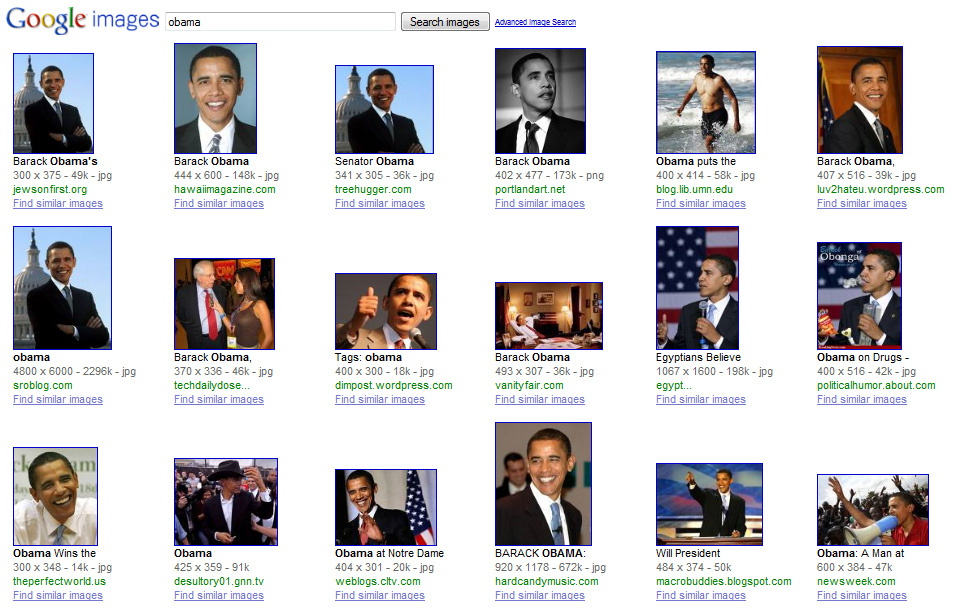

That was simple. I did a simple search for "obama" on Google Images and then copied the search URL into shapecollage.com. Within seconds, the tool pulled all the photographs of Obama found on Google Images and turned them into a nice photo collage.
This collage is interactive because if you click any of the thumbnails in this pile of photographs, it will open the full resolution picture on original website so you don’t miss the context. Internally, Shape Collage uses an HTML image map to maintain this image-to-source mapping. Here is another photo created by the site.

You can also create collages by merging photos from multiple sites into one – like a single collage for your Flickr and Picasa albums.
The Shape Collage Online web application is a complement to the Shape Collage desktop software, which includes additional features including the ability to generate high resolution collages.
Simple video demonstrating the venom extractor
This post is for the people who will be intersted in trekking and going to different places. There is a possibility for a snake byte when we go into the think and dense forests.
Here is the demo for how to use Venom Extractor
Here is the demo for how to use Venom Extractor
Wednesday, November 11, 2009
Uses of Vinegar
Vinegar is one of those all-time best-in-show sort of kitchen items to have around, because it can perform so many different life-saving duties. In fact, here's one that I recently learned -- perfect to add to my ongoing list of Why Vinegar is Awesome:
If you have an electric tea kettle with a bit of calcium build-up on the heating element, don't fret. Simply boil a mixture of equal parts vinegar and water, then empty. The calcium will flush out along with the vinegar mix, leaving your tea kettle fresh, new and smelling cleaner than ever.
For more incredible vinegar uses, check out these DIY Life articles:
-Place white vinegar in your washer at the beginning of a laundry load; it will both freshen and soften the clothes being washed.
-Half-fill an open travel mug with vinegar and leave it in your car's cup holder for a day to eliminate any vehicle odors.
If you have an electric tea kettle with a bit of calcium build-up on the heating element, don't fret. Simply boil a mixture of equal parts vinegar and water, then empty. The calcium will flush out along with the vinegar mix, leaving your tea kettle fresh, new and smelling cleaner than ever.
For more incredible vinegar uses, check out these DIY Life articles:
-Place white vinegar in your washer at the beginning of a laundry load; it will both freshen and soften the clothes being washed.
-Half-fill an open travel mug with vinegar and leave it in your car's cup holder for a day to eliminate any vehicle odors.
Gone Bananas!

Photo: Planet Protect
Of course, if you have a few less-than-desirable bananas laying around, you could always put them to good use, even if they're not the freshest fruit in your home. Turns out that bananas contain potassium, which is also a key ingredient in shoe polish. To polish your shoes, all you need to do is rub a banana peeling on your shoes, buff with a soft cloth, and then sit back and admire your shoe polishing job.
Google safe search.. Its more to search internet now
As Bing is already providing safe search now Google had a think about it and they have come up with this safe search idea. In this you can not only change the setting and also you can lock the preferences. View video for more into
Wonderful option from FACEBOOK to disable alerts from friends
Are you getting unnecesary updates from your friends?
Facebook have very good option. We can disable the alerts from the particular application or also we can totally disable the alerts from user.
Just keep your mouse on the top of the update/alert on your facebook home page you will get option saying hide. Once you select you will get the option like "HIDE USER" or "HIDE"
Here is the image for your reference 
Facebook have very good option. We can disable the alerts from the particular application or also we can totally disable the alerts from user.
Just keep your mouse on the top of the update/alert on your facebook home page you will get option saying hide. Once you select you will get the option like "HIDE USER" or "HIDE
Here is the image for your reference

New updates on google calendar
 I have a bad habit of missing cricket matches because i don't know when these are scheduled.
Everytime i used to take help from my friends to know the events and next matches played by INDIA. This has been solved by the new sports calendar in Google calender. We can opt for several calenders which you are interested.
When click whats new on tab it will open to the tab shown in the below figure, from where you can search the events of your interest and get updates on your mail by subscribing to your calender

Google enhances latitude to show your previous locations
Google latitude is one of the feature which shows your current location from where you are accessing the internet.
1. Google is enhancing its latitude feature to show the history of your previous locations. For this you need to enable your history in the Google latitude page. It may not be useful for you but it will be very useful for your secret followers (your wife!!!! be careful).
2. Second feature of this Google latitude is location alerts on your mobile which is still in beta stage.
3. We can also enable location badge at location badge
4. Important and friendly feature to tell your current location to your friends is updating your location on GTALK. You can enable this feature here.
Here is the general introduction video of the Google latitude
1. Google is enhancing its latitude feature to show the history of your previous locations. For this you need to enable your history in the Google latitude page. It may not be useful for you but it will be very useful for your secret followers (your wife!!!! be careful).
2. Second feature of this Google latitude is location alerts on your mobile which is still in beta stage.
3. We can also enable location badge at location badge
4. Important and friendly feature to tell your current location to your friends is updating your location on GTALK. You can enable this feature here.
Here is the general introduction video of the Google latitude
Want to increase google storage??
Running out of memory in google?? Now you can get additional storage very cheap. Read on...........
"Google updated the pricing for the additional storage you can buy in Gmail and Picasa Web Albums: $0.25 per GB per year.
Here's some historical data:
Pricing (August 2007)
Pricing (January 2009)
Google says that the storage is shared between Gmail and Picasa Web Albums, but it's obvious that the additional storage will mostly be used in Google Docs, when the service morphs into Google Drive.
'While storage costs have been dropping naturally, we've also been working hard to improve our infrastructure to reduce costs even further. Today, we're dramatically lowering our prices to make extra storage more affordable. You can now buy 20 GB for only $5 a year, twice as much storage for a quarter of the old price, and enough space for more than 10,000 full resolution pictures taken with a five megapixel camera,' explains Google.
If you've already purchased Google storage, there's a good news: 'Your total storage will be increased according to this page at no extra cost. For example, if you had previously purchased 10 GB of Google storage, you now have 80 GB available.'
I wonder how much free storage Google Drive will offer when it's released.
"Google updated the pricing for the additional storage you can buy in Gmail and Picasa Web Albums: $0.25 per GB per year.
| Storage | Price (per year) |
| 20 GB | $5 |
| 80 GB | $20 |
| 200 GB | $50 |
| 400 GB | $100 |
| 1 TB | $256 |
| 2 TB | $512 |
| 4 TB | $1024 |
| 8 TB | $2048 |
| 16 TB | $4096 |
Here's some historical data:
Pricing (August 2007)
| Storage | Price (per year) |
| 6 GB | $20 |
| 25 GB | $75 |
| 100 GB | $250 |
| 250 GB | $500 |
Pricing (January 2009)
| Storage | Price (per year) |
| 10 GB | $20 |
| 40 GB | $75 |
| 150 GB | $250 |
| 400 GB | $500 |
Google says that the storage is shared between Gmail and Picasa Web Albums, but it's obvious that the additional storage will mostly be used in Google Docs, when the service morphs into Google Drive.
'While storage costs have been dropping naturally, we've also been working hard to improve our infrastructure to reduce costs even further. Today, we're dramatically lowering our prices to make extra storage more affordable. You can now buy 20 GB for only $5 a year, twice as much storage for a quarter of the old price, and enough space for more than 10,000 full resolution pictures taken with a five megapixel camera,' explains Google.
If you've already purchased Google storage, there's a good news: 'Your total storage will be increased according to this page at no extra cost. For example, if you had previously purchased 10 GB of Google storage, you now have 80 GB available.'
I wonder how much free storage Google Drive will offer when it's released.
Saturday, November 7, 2009
World's worst digital TV customer service -AIRTEL
I was mentally harassed by the service provided by the airtel digital TV.
It was going very fine until 6 months from the day i took the service. Time has come to recharge and their problem started.
They were not allowing to change the package and in case if you want to change the package then you need to take package for one year... What is the bluddy idiotic rule is this???
So we have decided to continue on the same package even though it was costing us around 12Rs per day. We would have been more happy if the service continued as we mentally decided to pay Rs 12 Per day... and we have recharged with Rs 2700!!!!!!!!!!!!!
But the problem started when they have activated (without any notice from our side) some useless package for 12 months which made our balance to go into negative and with that they have disconnected our services and its been four days and i have called customer care for 6 times. Every time i call them the first dialogue i will get after greetings from the customer rep is "SIR SYSTEM IS DOWN CALL US AFTER 15Mins" what the hell customer care is doing when the system is down???? Believe me then have told me this when i called all the six time. When i escalated to Manager system started working, he will provide all the information. What's happening?????
Stay away from DIGITAL TV... CABLE OPERATOR IS THE BEST ONE.....
DONT GET USED TO DIGITAL TV IT WILL GIVE YOU NOTHING BUT SLEEPLESS NIGHTS........
It was going very fine until 6 months from the day i took the service. Time has come to recharge and their problem started.
They were not allowing to change the package and in case if you want to change the package then you need to take package for one year... What is the bluddy idiotic rule is this???
So we have decided to continue on the same package even though it was costing us around 12Rs per day. We would have been more happy if the service continued as we mentally decided to pay Rs 12 Per day... and we have recharged with Rs 2700!!!!!!!!!!!!!
But the problem started when they have activated (without any notice from our side) some useless package for 12 months which made our balance to go into negative and with that they have disconnected our services and its been four days and i have called customer care for 6 times. Every time i call them the first dialogue i will get after greetings from the customer rep is "SIR SYSTEM IS DOWN CALL US AFTER 15Mins" what the hell customer care is doing when the system is down???? Believe me then have told me this when i called all the six time. When i escalated to Manager system started working, he will provide all the information. What's happening?????
Stay away from DIGITAL TV... CABLE OPERATOR IS THE BEST ONE.....
DONT GET USED TO DIGITAL TV IT WILL GIVE YOU NOTHING BUT SLEEPLESS NIGHTS........
Tuesday, October 27, 2009
Another interesting video from Google about WAVE
2 mins video means a lot and gives you more information.
General introduction of the google Wave
General introduction of the google Wave
Thursday, October 22, 2009
Google Calendar Snooze
"Google Calendar implemented a basic snooze feature for pop-up notifications. You can click on 'remind me again in 5 minutes' in Google Calendar's web interface.
'When alerted to an event via a pop-up notification and dismissing it, the calendar interface will show you an option to remind you again shortly. Click on that link if you want to be reminded of the event again,' explains Google.

'When alerted to an event via a pop-up notification and dismissing it, the calendar interface will show you an option to remind you again shortly. Click on that link if you want to be reminded of the event again,' explains Google.
Subscribe to:
Posts (Atom)